How to Set Up a Proxy in Dolphin Anty
Add an issued endpoint with New Proxy in a Dolphin Anty profile. Check its connection with the arrows beside the proxy entry, then launch the saved profile and verify a request from that window.
Documentation reviewed 31 October 2026 · Proxyca setup guide
Get your Proxyca connection details
Residential proxies
Buy a GB package. Open My proxies → Generate, choose quantity, country, city, protocol and rotation or sticky settings, then generate your connections.
Datacenter proxies
Open Static proxies, choose country, IP quantity and rental period, then pay. Open the issued order in My proxies.
Copy the host, port, username and password for one connection. The hostname:port:username:password format puts those four fields in that order. In a browser with separate fields, paste each value into its matching field and select the issued protocol.
Have the issued endpoint ready
Open the connection details supplied with your proxy order. Keep the host, port, protocol and any username and password together. Use the values for the same endpoint; do not combine a port from an example with credentials from an order.
A hostname is entered as issued. A port is a connection setting, not an IP address. When authentication is required, the proxy username and password are separate from your Dolphin Anty account login. Keep them out of screenshots you send to a public forum.
Add the endpoint to the intended profile
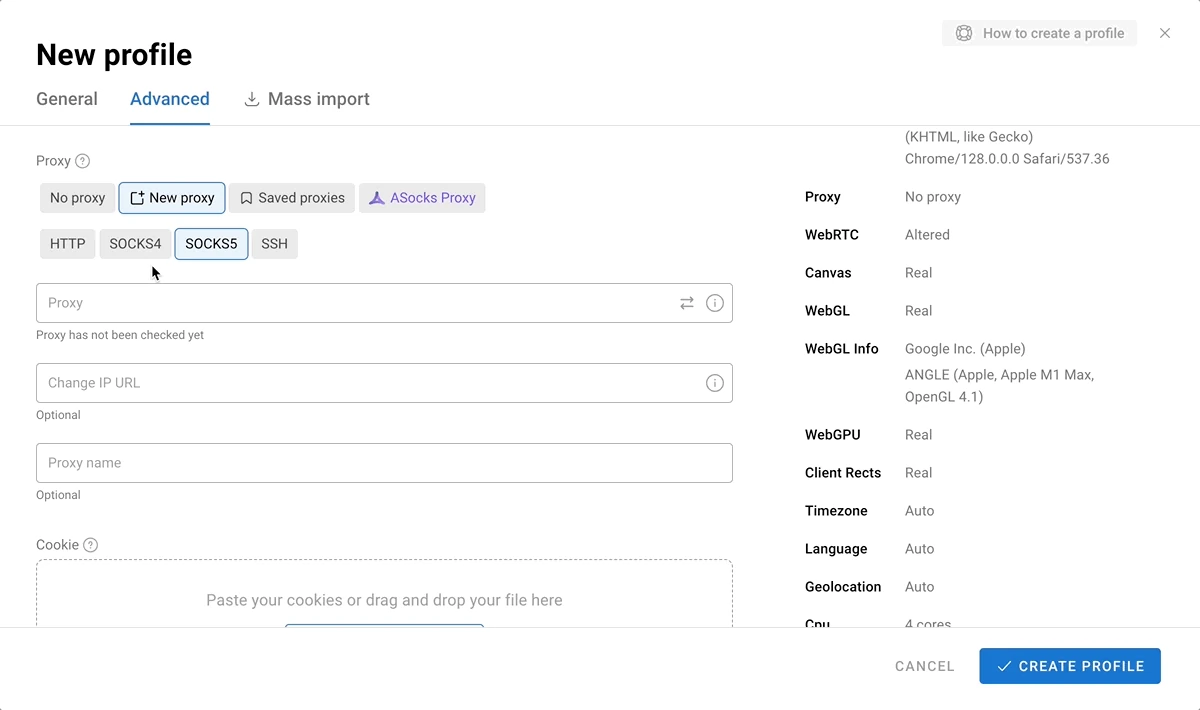
- Create or edit a browser profile and find its proxy controls. Choose New Proxy rather than No proxy.
- Use a documented entry format: host:port:login:password or login:password@host:port. A host:port entry is also supported when the endpoint does not need a username and password.
- Set the protocol to match the issued endpoint. Dolphin’s documentation also shows protocol-prefixed entries, such as socks5://login:password@host:port.
- Click the arrows beside the entry to check the connection. Review the result, save the profile, and launch that profile for your browser test.
Menu labels can vary by version. These instructions follow the Dolphin Anty: adding a proxy.
Keep a saved proxy distinct from its assignment
Dolphin also lets you add an endpoint from its Proxy screen, then choose a saved proxy for a profile. If you work from that list, confirm the assignment in the profile you intend to launch. A saved entry and a profile using that entry are separate things to check.
The optional Link to change IP field needs an actual change-IP URL supplied for the product. Leave it empty when your order does not provide one. A URL from a setup example, a normal website address or a Telegram purchase link cannot substitute for that endpoint.
What the proxy controls look like
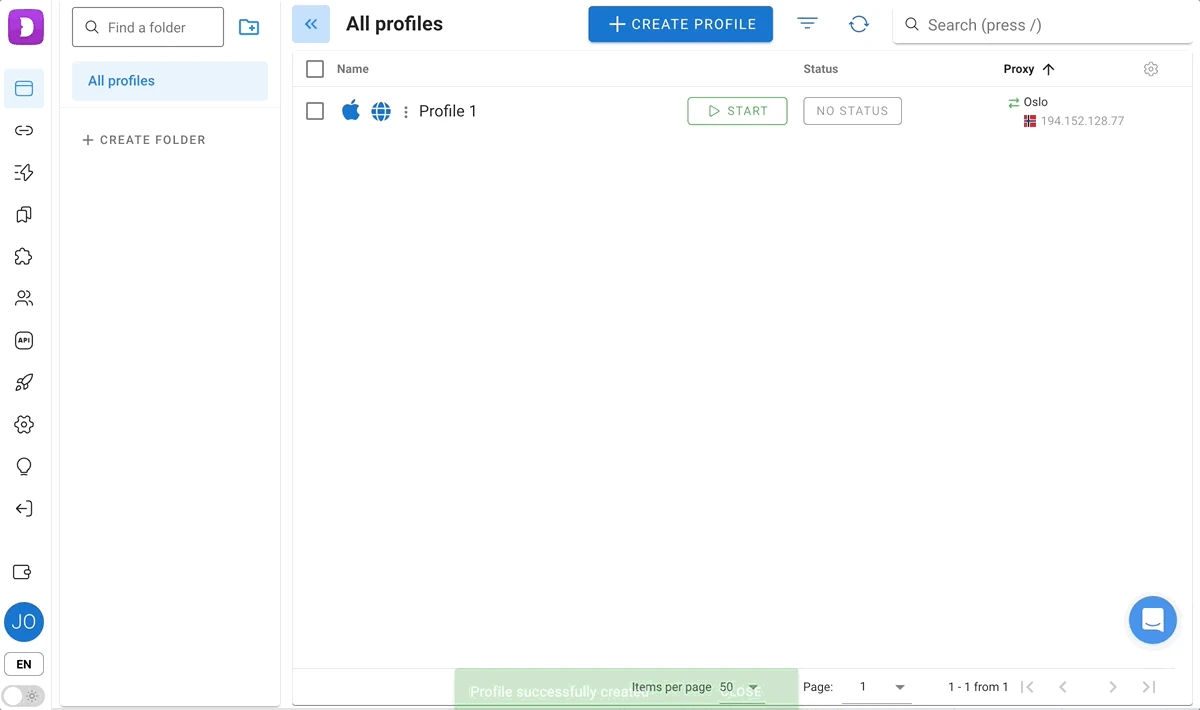
The images show the developer’s documented interface. Example credentials or profile names in them are not a Proxyca endpoint; enter the details issued with your own order.
Check the local connection path
After launching the profile, open a public-IP lookup in that profile window and record the result. Then visit your intended destination separately. Do not use an address seen in an unrelated browser window as evidence about this Dolphin profile.
A remote proxy-checking website can initiate a connection from its own server. That result may differ from a check on your computer, because the connection path is different. For troubleshooting, note where each check ran and which protocol it used; compare like with like.
If the arrows show an error, check the saved endpoint and order status first. If the profile opens and an IP lookup works but one website fails, record that website’s response separately. Avoid changing many profile settings at once: one recorded change makes a before-and-after comparison easier to interpret.
The public IP tool checks the request from the browser window where you open it. It does not test an endpoint configured only in another application.
If the first attempt fails
Change one setting at a time and repeat the same request. Start with typing or paste errors, the selected protocol, and the active order. When an import string parses unexpectedly, inspect its fields rather than repeatedly pasting the whole value.
For an HTTP proxy response of 407, investigate proxy authentication. A different destination error needs its own diagnosis; a failing page alone does not identify which component rejected the request. See the connection testing guide for a fuller sequence.
To troubleshoot the connection, record the order number, application version, endpoint host and port, selected protocol, test time and exact error. Redact passwords and tokens. State whether the failure happens in the checker, the launched profile or only one destination.
Dolphin Anty proxy questions
Can I choose an endpoint already in Dolphin’s proxy list?
Yes. The documented profile controls allow selection of a saved proxy. Check which entry the profile uses before launching it.
Where is the connection check?
Use the arrows beside the proxy entry. Keep its result and time alongside the result from the launched browser profile.
Does a change-IP field mean my order supports rotation?
No. Only use it with a change-IP link actually supplied for that product. An empty field does not establish a fault in the endpoint.
Choose a product for your connection requirements
Compare the available plans by billing unit, required location and application compatibility. A successful proxy connection is not a guarantee that a website will accept an account or request. Use the service within the destination’s rules and your authorization.
All application setup guides include the existing AdsPower walkthrough. For current interface details, also see Dolphin Anty: checking a proxy.
Choose a proxy for your browser profiles
Use residential traffic for country and city settings, rotation or sticky sessions. Start with 1 GB for $8, then generate connections in Telegram. Choose datacenter rental when your profile needs a static rented IP: from $2.50 per IP for 30 days.
Residential packages → · Static IP plans → · Test your connection →