Set your order
Open Static proxies in the Proxyca bot. Choose country, number of IPs and rental period.
Rent static IPs from $2.50 per IP for 30 days. Choose the country, quantity and rental period before payment.
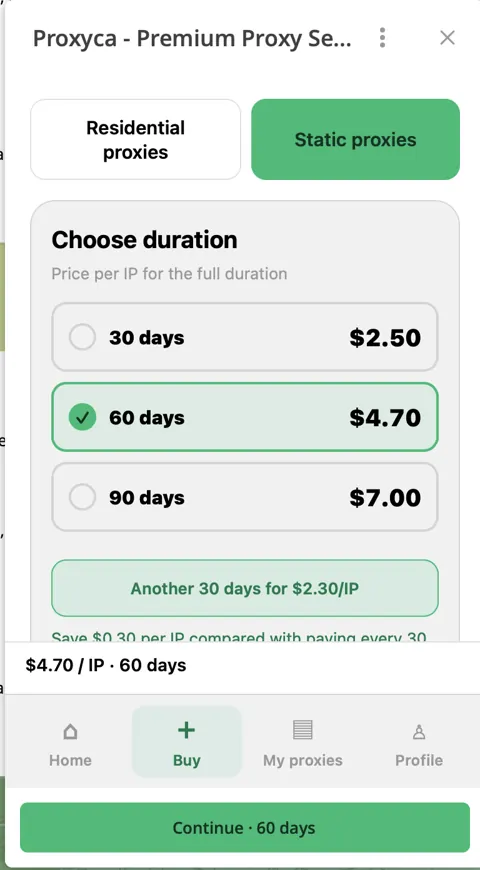
Choose your rental period ↓Buy and manage your IPs in the Proxyca Telegram bot
Each price covers one IP for the full term. Select the number of IPs when you create the order.
Savings compared with paying for successive 30-day periods. Start with one IP to test your setup.
Find a country guide, then choose your location in the bot when creating the order.
Choose your country when creating the order. Explore the country guides for location details, then see the current selection in Telegram.
Open Static proxies in the Proxyca bot. Choose country, number of IPs and rental period.
See the full order total and choose your payment method.
Open My proxies to retrieve the issued connection details and connect your application.
Need rotating connections? Explore residential traffic →
| Billing | Per IP for the rental period you select. |
|---|---|
| Location | Country selection when creating your order. |
| Quantity | Choose the number of IPs you want to rent. |
| Connection | Issued host, port and authentication details in My proxies. |
| Management | Retrieve access details and manage renewals in Telegram. |
Follow the guide for your browser or workflow.
Open the Proxyca bot and choose Static proxies. Select the rental period, country and number of IPs, then pay for the order.
Choose your country in the order form before payment. Browse our country guides to find the location for your workflow.
Choose 60 days to save 6%, or 90 days to save approximately 6.7%, compared with buying successive 30-day periods.
After your order is issued, open My proxies. Copy your host, port and authentication into your application, or follow a browser setup guide.
Yes. Open your datacenter order in My proxies and choose the renewal action. The bot shows the renewal total before you confirm.
Use the browser setup guides or contact Proxyca support in Telegram for help with your connection settings.
Set your country, IP quantity and rental period in the Proxyca bot, then get connected.
Buy in Telegram ↗Opens the Proxyca bot in Telegram
Prepare your proxy list, test a connection and compare your browser IP.