Proxy Setup Checklist for Social Media Teams
Give each working browser profile a documented connection and a clear owner. For a static setup, choose a datacenter country, IP quantity and rental term in Proxyca. Add the issued details to the profile, test the connection and keep renewal information with the team’s setup notes.
Choose static rental or residential traffic
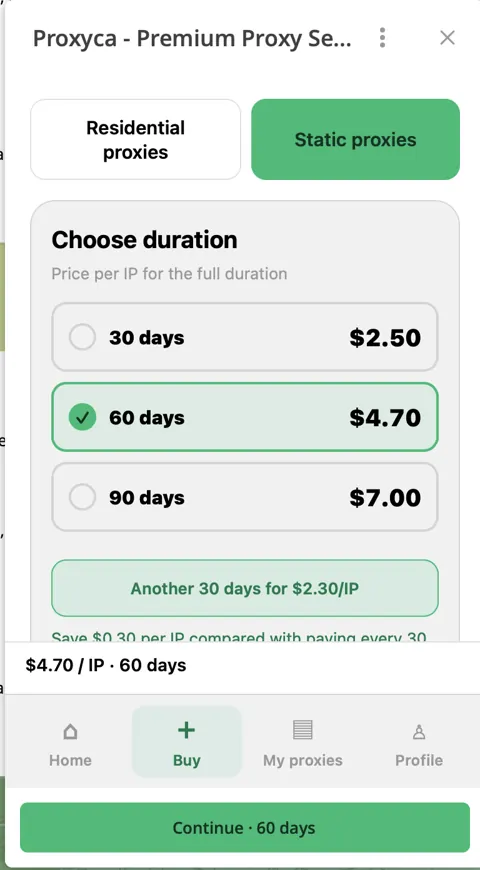
Static datacenter rental is a straightforward choice when a team wants a consistent IP connection for a selected term. In Proxyca, this product is called Static proxies. Start with one IP for $2.50 for 30 days, or choose 60 days for $4.70 and 90 days for $7.
Residential traffic fits tasks needing country and city selection, rotation or sticky sessions. Buy GB first, then generate connections from your balance. A 1 GB package costs $8. Compare the two purchase models before deciding how to connect your profiles.
Choose a location that fits your actual team workflow. A static IP rental and a browser profile are separate resources: keep their assignment documented so team members know which connection belongs to the profile they are using.
Buy and retrieve your static proxies
- Open the Proxyca bot and select Static proxies.
- Choose the rental period, country and number of IPs.
- Review the order total and pay using the payment flow.
- Once the order is issued, open My proxies.
- Copy the issued host, port and authentication details for the connection you will assign.
Use a simple internal label for each assignment: Team · profile · proxy order. An order number helps support locate a purchase, while the browser-profile label tells your colleagues where that connection is used.
Configure the browser profile, not just the proxy list
Open the profile’s settings, choose its proxy protocol and enter the issued host, port, username and password. If your browser stores proxies in a separate manager, save the connection there and then assign it to the intended profile. Saving a proxy entry alone does not complete that assignment.
Use the illustrated guide for Multilogin, Dolphin Anty, Octo Browser or your other browser. Match the protocol to the issued connection instead of selecting one by habit.
Launch the configured profile and test from that window. A successful check in your normal browser does not establish which connection a separate profile uses.
Use a repeatable profile acceptance check
- The intended proxy is selected in the saved profile.
- The browser’s proxy test completes with the entered credentials.
- The launched profile can open your normal test page.
- The observed exit address matches the connection you are documenting.
- The next team member can find the profile and its setup notes.
The public IP tool can show the address observed from the launched browser. The endpoint checker tests an individual public HTTP or SOCKS5 proxy. Use each result for the connection that actually made the request.
Make handovers clear and keep secrets separate
| Team record | Example |
|---|---|
| Profile label | Brand A · editorial team · primary browser. |
| Connection owner | The teammate responsible for configuration and renewal. |
| Proxy order | The internal label or Proxyca order number. |
| Location and term | Selected country and rental end date shown in the bot. |
| Credential storage | A team password manager or the browser’s controlled proxy settings. |
A proxy username is not a social-account login. Share access through your platform’s and browser workspace’s permission tools, and keep passwords out of campaign spreadsheets. When access changes, update the relevant credential or workspace permission rather than assuming a proxy change handles team access.
Manage renewals and troubleshoot changes
Open the datacenter order in My proxies to review the order and available renewal action. Assign renewal ownership before the rental ends. The bot shows the renewal total before confirmation; use that displayed price for the actual action.
If a profile stops connecting, check the assigned proxy, copied port, credentials and rental status first. Preserve the exact error and profile label. For a purchase or connection issue, contact Proxyca support in Telegram with the order number and symptoms.
Frequently asked questions
What are datacenter proxies called in the bot?
Select Static proxies. Choose the country, IP quantity and rental period, then retrieve the issued details in My proxies after payment.
Does every profile need a new proxy purchase?
Plan your connection assignments around your team’s needs. The browser profile and the rented IP are separate resources; document which connection each profile uses.
Can I use residential proxies with my browser profiles?
Yes. Buy residential traffic and generate connections with the available country, city, protocol and session settings. Then add the issued details to the browser profile.
Does a static proxy guarantee account acceptance?
No. A proxy provides the network connection. Account access and platform decisions also depend on the account, permissions and the destination’s own rules.
Set up your connection in Proxyca
Choose residential traffic or static datacenter rental, then get your connection details in Telegram.
Choose proxies in Telegram ↗