Proxies for Affiliate Marketing & Media Buying
Residential and datacenter proxies for affiliate marketers and media-buying teams. Check offers and landing pages from your target GEO, assign a static IP to an antidetect profile, and manage connections in Telegram. No KYC, USDT payments.
Which proxy fits your task?
| Task | What to choose |
|---|---|
| Check offers, landing pages and redirects by GEO | Residential: sticky session and an available city |
| Keep a static IP assigned to an antidetect profile | Datacenter: 30, 60 or 90-day rental |
| Compare creatives and results from different countries | Residential: separate target-GEO connections; rotation when changing IPs |
| Collect data from ad-spy services and competitor pages | Residential: rotation for your data-collection client |
Connect residential proxies
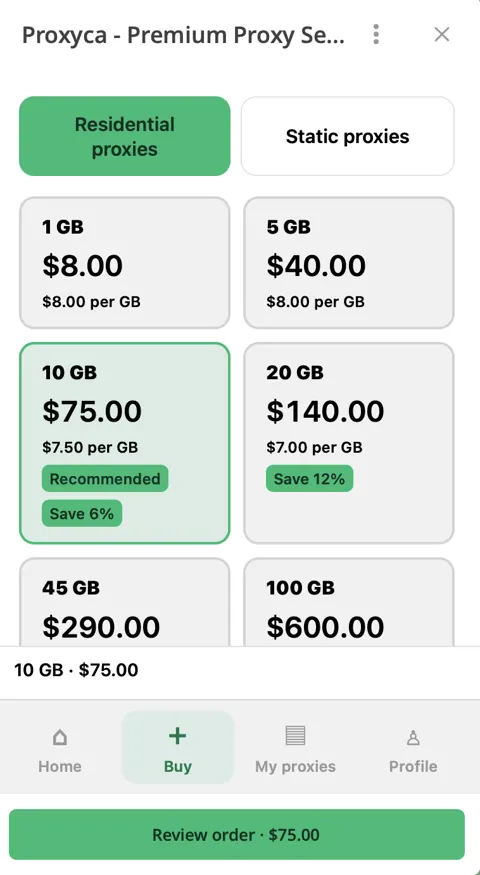
- Open Buy → Residential proxies in the bot and purchase traffic. The entry package is 1 GB for $8.
- After the GB balance is credited, open My proxies → Generate. Choose connection quantity, country, an available city and protocol.
- Use a sticky session for a multi-step landing-page check, or rotation for a task that needs changing IPs.
- Generate and copy the host, port, username and password into the profile. The connections share your traffic balance.
Connect datacenter proxies
- Open Static proxies in the bot. This is the datacenter product.
- Choose country, IP quantity and rental term: 30, 60 or 90 days.
- Pay for the order. Pricing starts at $2.50 per IP for 30 days.
- Open the issued order in My proxies and configure the intended profile with its connection details.
Check offers and landing pages by GEO
Open your landing page or test URL through a profile with the selected GEO. Record the entry and final URLs, language, currency, price, offer availability and button behavior. Keep browser language, viewport and cookie state consistent when comparing results.
Keep one connection for a multi-step check. Use separately labelled profiles for country comparisons. Test your own destination flow without generating repeated paid-ad clicks.
Configure your antidetect profile
Follow the Dolphin Anty, AdsPower or Octo Browser guide. Enter the issued host, port, username and password, then select the matching protocol. Run the browser connection check before opening the landing page in that profile.
If the connection fails, use Proxy Checker. Compare the browser IP before and after setup with What is my IP? in that same profile. Find all antidetect browser guides in the integrations hub.
Frequently asked questions
Which proxies work best for affiliate marketing?
Choose residential proxies for location-based offer and landing-page checks, with country and available city settings. Choose datacenter rental when a profile needs a static IP. Match the connection to the task and your application.
Residential or datacenter proxies for an antidetect profile?
Residential connections provide location selection, rotation and sticky sessions. Datacenter rental provides a static IP for the selected term. Configure the issued host, port and authentication using a protocol supported by the connection and browser.
How much traffic does one browser profile need?
There is no fixed allowance per profile. Usage depends on pages, images, video and activity. Start with 1 GB, measure your workflow and choose the next package from observed usage. Purchased residential traffic does not expire.
Which antidetect browsers have setup guides?
The site includes guides for Dolphin Anty, AdsPower, Octo Browser, Multilogin, GoLogin, Vision, Aurorium Browser, Undetectable and Linken Sphere. Match the selected protocol to your issued connection and browser.
Choose proxies for your team
Compare residential packages and datacenter rental terms. Buy and manage your connections in Telegram.
Choose in Telegram ↗